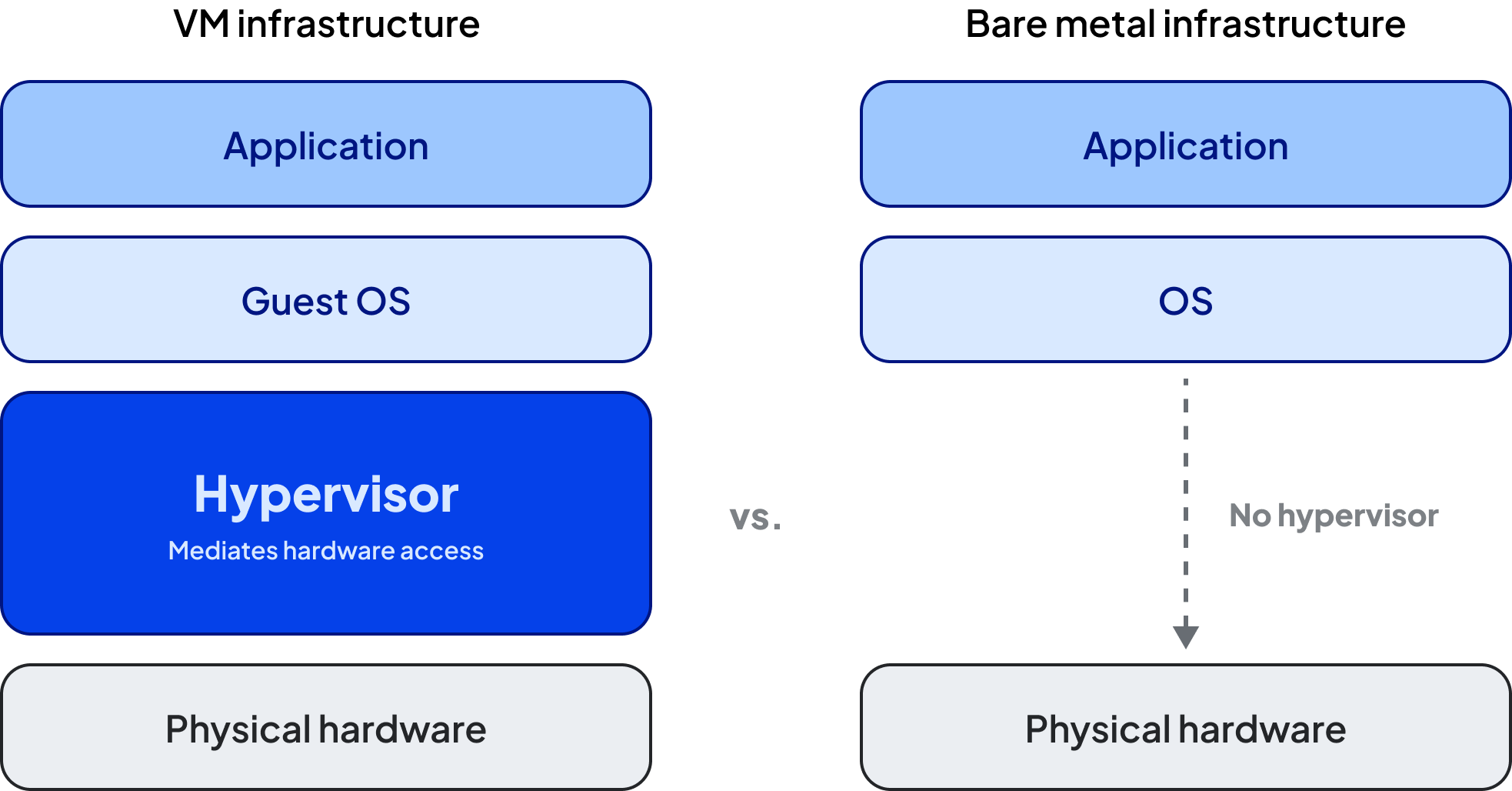
A hypervisor sits between the physical hardware and the virtual machines running on top of it. It partitions the host machine's resources—CPU, memory, storage, and network—and allocates slices of each to individual VMs. Every VM gets its own guest operating system and sees a virtualized version of the hardware beneath it.
In cloud and data center environments, hypervisors like KVM and VMware ESXi run directly on the physical hardware without an underlying OS, giving them direct and efficient access to the resources they manage. This differs from hypervisors that run as applications within a host operating system, making them common in desktop environments, like VirtualBox or VMware Workstation.
From the user's perspective, the process looks like this:
- A VM is provisioned by specifying CPU cores, memory, storage size, and an OS image. This happens through a cloud console, API, or hypervisor management tool.
- The hypervisor allocates resources from the physical host—carving out a protected memory region, scheduling CPU time, assigning virtual network interfaces, and mounting storage—then boots the guest OS from the chosen image.
- The VM appears as a standalone machine. Users SSH in, install software, and run workloads exactly as they would on a physical server. The guest OS operates largely as though it owns the machine, although modern operating systems can often detect that they are running in a virtualized environment.
- The hypervisor continuously arbitrates as the VM runs, scheduling CPU time across all VMs on the host, enforcing memory boundaries, and routing network traffic. This layer is invisible to the user.
- When the session ends, the VM can be stopped, snapshotted, cloned, or deleted. The hypervisor reclaims its share of resources and can reallocate them elsewhere, often to another tenant's workload within seconds.
%20Image%201.png)
Virtual machine performance and trade-offs
Because the hypervisor mediates all hardware access, everything below the guest OS is opaque. GPU utilization, memory bandwidth, NUMA topology, and PCIe configuration are all abstracted away from the VM layer.
This abstract works well for general-purpose, less compute-intensive workloads. But for AI and HPC workloads where maximum hardware performance is the goal, that opacity becomes a real constraint. If a training job underperforms, there's no direct visibility into whether the problem is resource contention from a neighboring virtual machine, hypervisor scheduling overhead, or a hardware-level bottleneck. Troubleshooting becomes elimination rather than observation.
Virtual machines and cloud computing
Virtual machines and cloud computing are deeply intertwined. Understanding that relationship helps clarify how cloud infrastructure actually works.
Hyperscalers like AWS, Azure, and GCP began as fundamentally VM businesses and still use VMs for many general-purpose workloads. In this model, the hypervisor takes large pools of physical hardware, runs hypervisors across them, and sells slices of that capacity to customers as virtual compute instances. Virtual machines make this possible: they allow multiple customers to share the same physical server while remaining logically isolated from one another.
From the provider's perspective, VMs are operationally convenient. They're easier to provision, migrate, and secure at scale than giving each customer dedicated physical hardware.
Virtual machine configurations in cloud
Cloud VMs come in two broad tenancy models. In a multitenant configuration (the default for most public cloud instances), multiple customers share the same physical host. In single-tenant configurations, a dedicated host or dedicated instance is provisioned to one customer, providing stronger isolation for compliance or security-sensitive workloads, typically at higher cost.
Most cloud providers price virtual machines on a pay-as-you-go basis (by the hour or second), with discounts available for reserved capacity commitments of one to three years. Spot or preemptible instances offer lower prices in exchange for the provider's ability to reclaim capacity without notice.
Benefits and challenges of virtual machines
VMs offer real advantages, particularly for workloads that prioritize flexibility over raw performance. But the same abstraction layer that makes them convenient also introduces tradeoffs worth understanding before committing to a virtualized infrastructure strategy.
Benefits of virtual machines
- Fast provisioning: VMs spin up and come down in seconds; however, booting the OS to start the system can take several minutes
- Snapshot and rollback: VMs can be saved at any point and restored if something breaks, which is especially useful for testing and development workflows
- Isolation between environments: each VM is sandboxed from its neighbors, making them practical for running untrusted code or maintaining strict environment separation
- Cost efficiency for variable workloads: sharing physical hardware across multiple VMs improves utilization per dollar, especially for workloads that don't require dedicated resources
- Portability: VMs can be migrated between physical hosts, on-premises environments, and cloud providers with relatively little friction
The challenges with VMs
- Hypervisor overhead reduces performance: for compute-intensive tasks like AI training, even modest inefficiencies compound over multi-day jobs into meaningful extra time and cost
- The black box problem limits observability: hardware behavior isn't directly inspectable from inside a VM, making it harder to trace performance issues to their root causes
- Resource contention in multi-tenant environments: neighboring VMs' workloads can degrade performance, a "noisy neighbor" effect that's difficult to predict or eliminate without moving to a dedicated host
- Not suited for large-scale AI training or HPC: hypervisors can interfere with the tightly coupled GPU interconnects that large model training depends on
- GPU access is limited: standard VM configurations don't provide direct hardware GPU access, and workarounds like GPU passthrough add complexity without delivering full bare-metal performance
Virtual machines vs. bare metal
The decision between VMs and bare metal comes down to what your workload actually needs. Neither is universally better; they optimize for different things.
When comparing bare-metal and virtualized GPU instances, the decision often comes down to how well each approach handles real-world demands. Performance isn’t one-dimensional; it’s shaped by factors like latency, scalability, and overall efficiency. Looking at these considerations side by side helps highlight where each option shines and where trade-offs emerge.
It's also worth noting a third option: containers running directly on bare metal. Containers offer VM-like portability and environment isolation without the hypervisor overhead, and they've become the standard deployment unit for most AI workloads at scale. In many modern AI infrastructure stacks, containers on bare metal replace the role VMs once played in providing environment flexibility.
For a deeper look at bare-metal infrastructure and when it makes sense, see: What is bare metal?
VM use cases
One area where virtual machines particularly excel is interactive computing. If the primary requirement is a flexible, isolated environment where a person (or a lightly automated process) is interacting with a system, virtual machines are a natural fit. This can include running notebooks, writing and testing code, accessing a desktop interface, or iterating on a small model.
Concretely, the use cases where VMs work well include:
- Development and testing environments: developers can spin up isolated environments with a specific OS, runtime, and dependencies, test in them, and tear them down when done; VM templates make it easy to standardize environments across a team
- Interactive notebooks and IDE access: for data science teams that need individual GPU access for exploration and experimentation rather than sustained training runs, a VM with a single GPU attached can offer a practical and cost-efficient environment
- Software compatibility testing: Virtual machines make it easy to run multiple operating systems on a single machine, which is useful for testing software across different environments without maintaining separate physical hardware for each
- Security-sensitive isolation: the sandboxed nature of virtual machines makes them useful for running untrusted code, malware research, or highly regulated workloads where tenant isolation is a compliance requirement
- Cloud migration and hybrid scenarios: VMs can be moved between on-premises and cloud environments, making them a practical tool for teams migrating workloads or operating in hybrid cloud setups
Where generic multitenant VMs may not be the right tool is equally worth stating clearly: sustained AI training, large-scale inference, HPC simulations, and any workload that depends on tight GPU interconnects or low-jitter compute will run into the performance and visibility limitations described above. The competitors that lean heavily on VMs for AI workloads may do so because it's easier for them to operate.
The future of virtualization
The AI boom hasn't made VMs obsolete; it's clarified where they fit. For large-scale training and production inference, bare metal and container-based approaches have become the standard. But for the development and iteration work that surrounds those workloads, virtual machines remain a practical tool.
The more interesting shift is in how virtualization technology itself is evolving. Techniques like GPU passthrough and SR-IOV are giving VMs near-bare-metal access to GPU resources by reducing the layers of abstraction between the VM and the hardware. This narrows the performance gap in specific configurations and makes VMs more viable for workloads that previously would have demanded bare metal.
Better observability tooling is also improving the black box problem. Newer hypervisors and cloud platforms are exposing more hardware-level metrics to VM tenants, giving teams more insight into what's happening beneath the abstraction layer, though this remains more limited than what you get with direct hardware access.
The result isn't a world where VMs replace bare metal or vice versa, but one where the choice is better understood. Teams running foundation models and latency-sensitive inference will continue to favor bare metal. Teams building, experimenting, and iterating will continue to reach for the flexibility VMs provide. The strongest infrastructure strategies use both deliberately.